 Home
 Samples
 Help
 Buy Now
 Download
 Contact Us
Create superior web buttons and menus in a few clicks!
Free Buttons for Web helps you create animated mouse over webpage menus and buttons with ease.To work with the program is so simple. Just modify the visual parameters of buttons for web such as material, shadow, 3D shape, lighting, texture, deformation. All other actions will be done by the program. Free Buttons for Web creates professional quality button images (gif, jpeg, bmp), generates a web script that interacts with normal, mouseover, and click mouse events for roll over effect, and inserts the menu into your web html page in a place you want buttons to appear. You can also use a large set of templates that allows you to make your cool web button menu even faster!
WEB SITE MENU BUTTONS SAMPLE
Below you can see samples of just some of web menu button designs you can develop with Free Menu Buttons.The left column contains button screenshots (click to enlarge), the right one contains live examples.
HOW TO CREATE THE MOUSEOVER BUTTON MENU WITH CREATOR
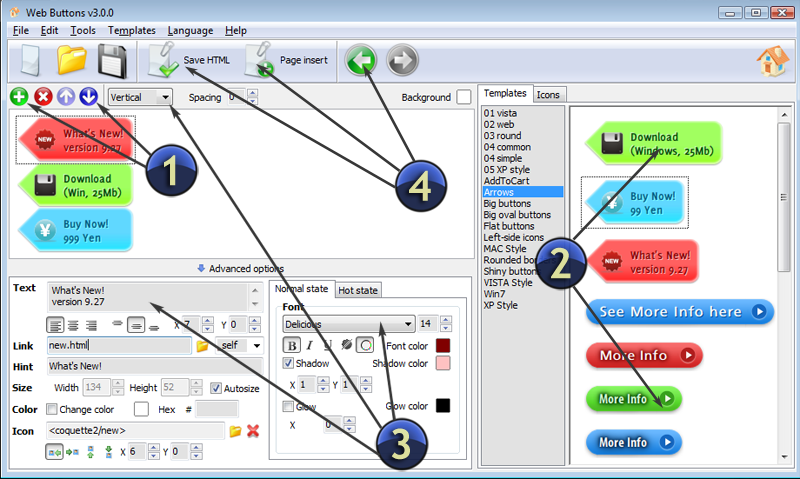
- Click "Add item" or "Delete selected item" buttons situated on the Web Button's Toolbar to add/delete buttons. You can also use "Move selected items" buttons and move your buttons inside the menu.
- Use ready to use Templates to create your buttons. To do it just select the template you like in the "Templates" tab.Then you can browse these template backgrounds. When you find a button template you like, double-click it to apply.
- Adjust appearance of your buttons.
- 3.1. Define the button's orientation.
- 3.2. Select web button by clicking it and change button's appearance for normal and mouse over states and set button's link properties and link target attributes.
- Save your buttons.
- 4.1. Save your project file. To save a project just click "Save" button on the Toolbar or select "Save" or "Save As.." in the Main menu.
- 4.2. Save your buttons in the HTML format. To do it click "Save HTML" button on the Toolbar or select "File/Save as HTML..." in the Main menu.
- 4.3. Insert your free button images html into the existing HTML page. To do so, click "Page insert" button on the website buttons Toolbar. "Build the Menu Into Your Page" dialog will appear.Www Freebuttons Orig 3 State Free Button
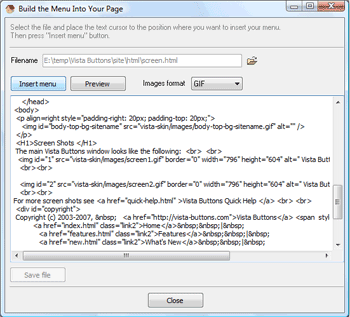
Choose a page you want to insert your buttons into. Then set the cursor to the line you want theJava Buttoncode to be added to and click the "Insert Menu" button. The button's code will be inserted into the page. Then you can either save the page or close the dialog without saving.
FREE WEB BUTTON CONTACT


FEEDBACK
Great web design software, simple and efficient. Thank you.
Free buttons is the best I have ever seen.
Hi,
Good free web graphics software!
 I translated the language file into spanish.
 Download it if you need it, it works fine.